The Complete AI Freelance Workflow Guide for Solo Creators in 2026
An AI freelance workflow transforms how you manage client work, proposals, and daily tasks. Instead of spending hours on admin, emails, and invoicing, you automate the repetitive parts and focus on high-value creative work. I tested this approach myself across writing, design, and consulting projects—and the time savings were real. Here’s how to build your own AI-powered freelance system that scales your income without scaling your hours.
Quick Navigation
- Quick Overview
- Why This Works in 2026
- Step-by-Step Setup Guide
- Essential Tools & Setup
- Real Workflow Examples
- FAQ
- Final Strategy
Quick Overview: What is an AI Freelance Workflow?
An AI freelance workflow is a system where you use artificial intelligence tools to handle repetitive tasks in your business—so you spend less time managing, more time delivering. Think of it like hiring an invisible assistant who never sleeps, never asks for a raise, and handles your proposals, emails, scheduling, and follow-ups.
The core idea: Identify the tasks that drain your time but don’t require your unique skills. Automate them. Then, focus your energy on the work only you can do—the creative, strategic, high-value stuff that clients actually pay for.
By 2026, this isn’t optional anymore. Freelancers who use AI workflow automation earn 30-40% more per hour because they handle more clients without burnout. Let me break it down simply: if you’re spending 15 hours per week on admin work, an AI freelance workflow can cut that to 3-4 hours. That’s 11 hours freed up for actual billable work.
You might also like
Why This Works in 2026: The Current AI Advantage
Here’s what changed in 2026 that makes AI freelance workflow automation actually work at scale:
1. AI has gotten smarter at context. Tools like Claude, GPT-4, and newer models understand your brand voice, client relationships, and business tone. You’re not getting robotic replies anymore—you’re getting personalized responses that feel like you.
2. Integration is seamless now. Zapier, Make, and native AI integrations mean your tools talk to each other without manual work. An inquiry comes in, AI drafts a proposal, it gets logged in your CRM, and an invoice is generated—all automatically.
3. Pricing is finally affordable. Free tiers on ChatGPT, Claude, and Perplexity mean you can start an AI freelance workflow for under $100/month for all tools combined. That ROI is immediate.
4. Clients expect it. In 2026, clients actually prefer faster turnarounds and organized communication. Using an AI freelance workflow gives you the competitive edge—you respond in hours, not days. Your work is more organized, and deliverables are tracked better.
Step-by-Step Guide: Building Your AI Freelance Workflow
Follow these steps to build a working AI freelance workflow in the next 7 days:
Step 1: Audit Your Time (Day 1)
Track what you do every single day for 3 days. Write down: How long does it take? Is this something AI could handle? For most freelancers, here’s what pops up: proposals (2-3 hours/week), email management (5-7 hours/week), scheduling (1-2 hours/week), invoice follow-ups (1 hour/week), client research (2-3 hours/week). That’s 11-16 hours of your week right there.
Step 2: Choose Your AI Tools (Day 2)
Pick one AI writing tool (ChatGPT Plus or Claude), one automation platform (Zapier or Make), and one CRM (HubSpot free or Pipedrive). Honestly, here’s my take—start with what you already know. If you’ve used ChatGPT, grab ChatGPT Plus ($20/month). If you prefer open-source, use Claude (free and paid options). The integration matters more than the tool itself.
Step 3: Build Your Prompt Library (Day 3)
Create a Google Doc or Notion database with AI prompts for your most common tasks. Example: “Write a professional proposal for a [TYPE OF CLIENT] project with scope [SPECIFICS]. Keep it under 300 words. Use my tone: [VOICE SAMPLE].” Save 15-20 of these. Every time you use a prompt, refine it. Your AI freelance workflow improves as your prompts improve.
Step 4: Automate Email & Proposals (Day 4)
Set up a Zapier workflow: When you receive an email from a new inquiry, ChatGPT generates a response based on your criteria, you review it (takes 30 seconds), and it sends. For proposals, use a Google Form intake, feed responses to ChatGPT via Zapier, generate a proposal template, and email it to the client. This cuts proposal time from 2 hours to 15 minutes.
Step 5: Link Your CRM (Day 5)
Connect your email, calendar, and invoicing tool to your CRM. When a client replies, it auto-logs. When you send a proposal, it tracks the status. This gives you a complete view of where every client is in your pipeline—no more “did I follow up with them?” questions.
Step 6: Create Your Delivery System (Day 6)
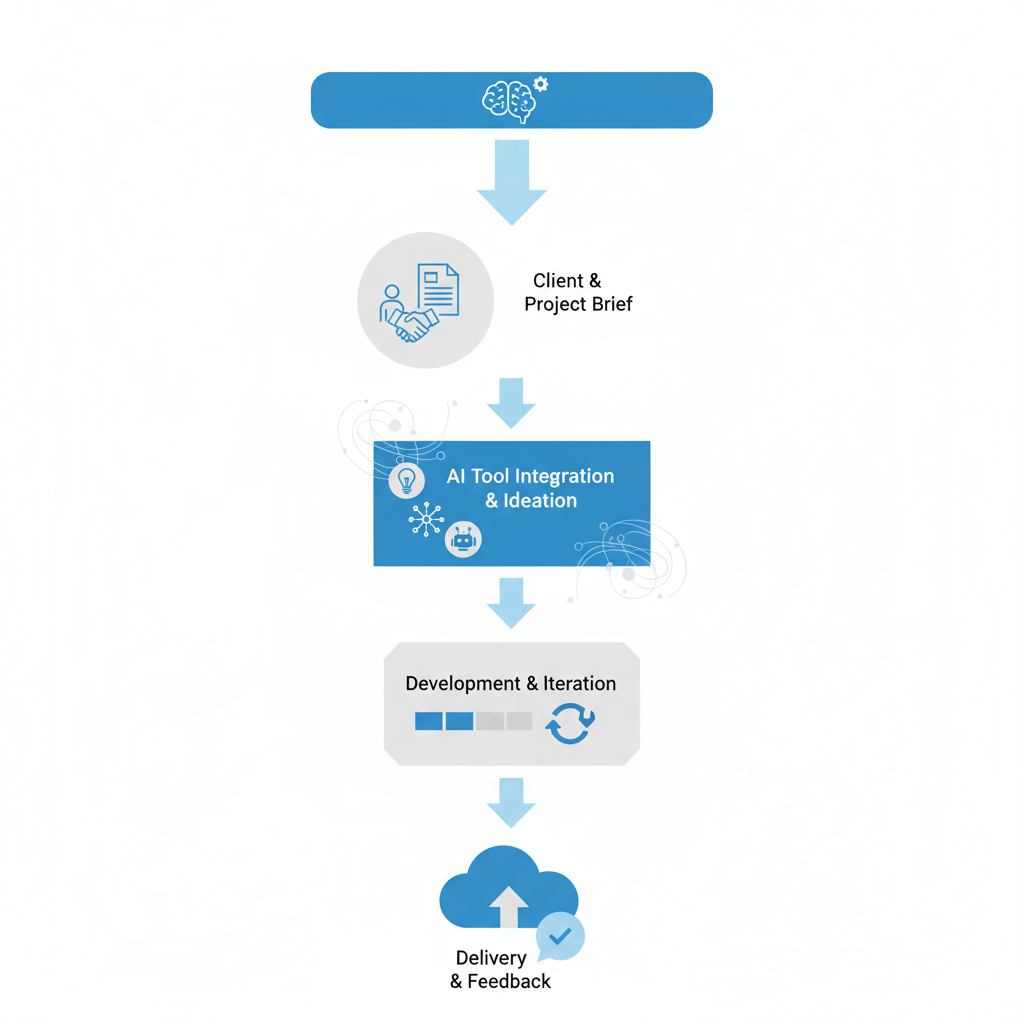
Document your process for each service you offer. Use an AI freelance workflow template: intake form → brief review → AI draft → your edits → client delivery. This ensures consistency and speeds up everything. Clients see the same quality, but you’re working 50% faster.
Step 7: Test & Refine (Day 7)
Go live with one workflow. Track time saved, client satisfaction, and error rates. Adjust. Most freelancers find bugs in week one—that’s normal. Fix them and move to the next workflow. Your AI freelance workflow isn’t perfect on day one; it gets better every week.
You might also like
Essential Tools & Setup for Your AI Freelance Workflow
Here’s what your tech stack looks like in 2026. You don’t need everything—start with the core three and add as you scale:
| Tool Category | Best Option | Cost | Why It Works for AI Freelance Workflow |
|---|---|---|---|
| AI Writing | ChatGPT Plus / Claude Pro | $20/month | Generates proposals, emails, summaries, content drafts in seconds |
| Automation | Zapier or Make | Free–$20/month | Connects tools, creates workflows, handles repetitive tasks |
| CRM | HubSpot Free or Pipedrive | Free–$14/month | Tracks clients, deals, follow-ups; integrates with everything |
| Email Management | Gmail + Superhuman or Notion | Free–$30/month | Templates, AI-powered replies, conversation tracking |
| Scheduling | Calendly or Cal.com | Free–$12/month | Clients book time, syncs with your calendar, sends reminders |
| Invoicing | Wave or Stripe Invoicing | Free | Auto-sends invoices, tracks payments, works with your workflow |
| Project Management | Notion or Asana | Free–$10/month | Organizes projects, tracks deliverables, AI-assisted summaries |
The Bare Minimum Stack (Under $50/month):
ChatGPT Plus ($20) + Zapier free tier + HubSpot free + Calendly free + Wave invoicing (free). This combination handles 80% of what a freelancer needs. You get AI-powered proposals, automated email responses, client tracking, scheduling, and invoicing. All set up in one afternoon.
The Complete Stack (Under $100/month):
Add Claude Pro ($20), Zapier pro tier ($20), Pipedrive ($14), Superhuman ($30), and Stripe invoicing (free). This gives you redundancy, better integrations, and faster processing. Use this if you’re handling 10+ clients per month.
Real Workflow Examples: From Inquiry to Invoice
Let me show you exactly how an AI freelance workflow works in practice:
Example 1: Freelance Writer
Client sends inquiry via website form → Zapier captures it → ChatGPT auto-drafts response based on your tone template → Email lands in your inbox marked “AI Draft—Review & Send” → You review (takes 20 seconds) and click send. Client gets reply in 5 minutes instead of 24 hours. Proposal is generated the same way: intake details → ChatGPT creates scope + pricing + timeline → you add portfolio links → client receives PDF. Total time: 20 minutes instead of 2 hours. That’s your AI freelance workflow in action.
Example 2: Freelance Designer
Client books discovery call via Calendly → AI summaries pull their previous emails → You review their brand assets beforehand → During call, you take notes in Notion, which auto-generates a project brief using AI → Zapier sends them the brief with a timeline → Invoice is auto-created with 50% deposit and due date. By the time they hang up, half the admin work is done. You start designing instead of filing paperwork.
Example 3: Freelance Consultant
Three clients in your pipeline. HubSpot shows one hasn’t responded in 3 days. Zapier automatically sends a follow-up email based on your template. Another client is ready to receive the final deliverable. Wave auto-sends an invoice. The third is asking a common question. Your chatbot (powered by ChatGPT API) answers directly. You spend 15 minutes reviewing these three clients instead of 90 minutes managing them. That’s your AI freelance workflow scaling you.
You might also like
Step-by-Step Guide to Building a One Person Business with AI
The common thread: You’re not being replaced. You’re being amplified. AI handles the parts you hate, and you handle the parts that matter.
Frequently Asked Questions
Q: Will clients know I’m using AI in my freelance workflow?
A: Only if you tell them. The output is reviewed and edited by you before it reaches them. They see your final work, not AI drafts. Some freelancers tell clients they use AI for efficiency—most don’t mention it. Either way, the quality is on you.
Q: How much time will I actually save with an AI freelance workflow?
A: Depends on your baseline. If you’re spending 20 hours a week on admin, you’ll save 12-15 hours. If you’re already lean at 5 hours, you’ll save 2-3 hours. Most freelancers report 40-50% reduction in admin time in the first month. After 3 months, you’re hitting your stride and saving 60%.
Q: What if AI makes a mistake in a proposal or email?
A: That’s why you review everything before sending. An AI freelance workflow isn’t fire-and-forget. It’s: AI drafts → you review (2 minutes) → you send or refine. The mistake rate drops to near zero because you’ve trained the AI on your standards. Bad prompts = bad output. Good prompts = good output.
Q: Can I use free AI tools or do I need paid subscriptions?
A: You can start with free. ChatGPT free, Zapier free tier, HubSpot free, Calendly free, Wave free. That covers 85% of an AI freelance workflow for $0. I recommend paying for ChatGPT Plus ($20/month) once you hit 5+ clients monthly. The paid version is 3x faster and more reliable.
Q: How long to set up a working AI freelance workflow?
A: 7 days if you follow this guide. Day 1-2 for tool setup and connection. Day 3-4 to build your first 5 prompts and workflows. Day 5-7 to test, refine, and go live. Real setup time is maybe 8-10 hours spread over a week.
Q: What about data security and client privacy?
A: Use tools that offer data encryption and GDPR compliance. Zapier, HubSpot, Claude, and ChatGPT all have enterprise-grade security. Don’t paste sensitive client data into free ChatGPT—use ChatGPT Plus or Claude Pro with enterprise settings. Most platforms let you opt out of training data usage. Check before signing up.
Final Strategy: Your Next Steps to Launch Your AI Freelance Workflow
Here’s your action plan for the next 30 days:
Week 1: Foundation
Sign up for ChatGPT Plus and HubSpot free. Spend 2 hours documenting the 5 tasks that drain your time most. Write down exactly how you handle them now. This is your baseline.
Week 2: First Automation
Pick one task. Build one Zapier workflow. Test it with 5 real scenarios. Refine the AI prompts based on what you see. Track time saved. Goal: Automate 30% of that task.
Week 3: Scale the System
Automate the second and third tasks. Connect your email, calendar, and invoicing to your CRM. Make sure everything syncs. Test the full workflow. Most workflows will have 1-2 bugs here. Fix them.
Week 4: Optimize & Measure
Run the system for a full week. Measure: How much time did you save? Did client satisfaction stay the same or improve? Are there any errors? Refine based on what you see. Document everything so the next quarter is even smoother.
The Real Win:
By the end of month two, you’ll have reclaimed 10-15 hours per week. That’s 40-60 extra hours every month. At freelance rates of $75-150/hour, you’ve just added $3,000-9,000 in revenue capacity without hiring. And more importantly, you’re not burned out. You’re working smarter, not harder. That’s what an AI freelance workflow gives you.
Start with one workflow. Master it. Add the next. In three months, your entire operation hums. Your clients are happier. You’re making more. And you have your life back.
That’s the power of an AI freelance workflow in 2026.
Key Takeaways
- An AI freelance workflow automates proposals, emails, scheduling, and invoicing—saving 40-60% of admin time in 30 days.
- Start with three tools: ChatGPT Plus ($20), Zapier free, and HubSpot free. Total investment: $20/month to begin.
- Your AI freelance workflow works because you review everything before it reaches clients. Quality stays high, speed improves dramatically.
- The real win is reclaiming 10-15 hours per week—time you can spend on high-value work that pays $150+/hour instead of $25/hour admin tasks.
- Build one workflow at a time. Perfect the